
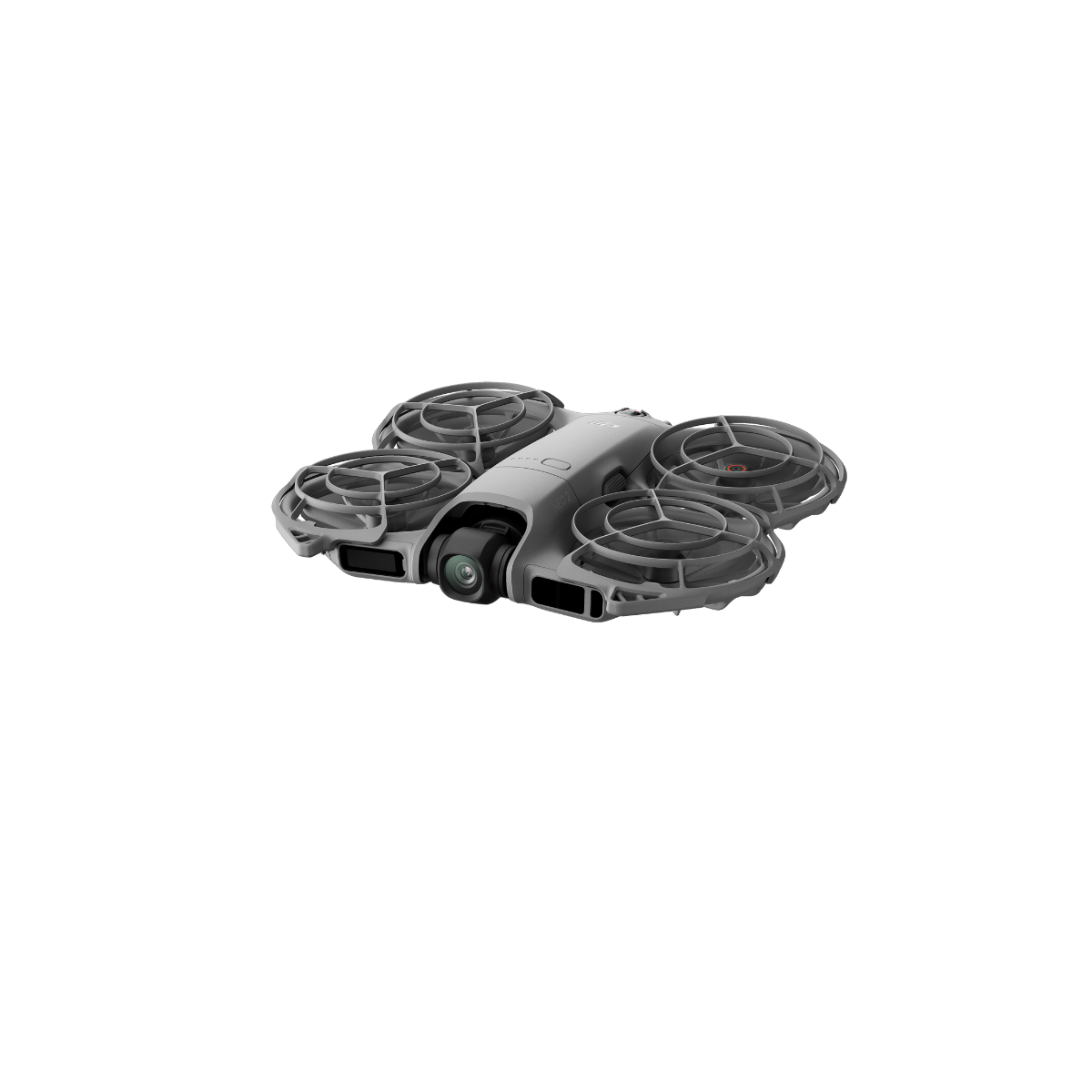

4K image quality[6], cinematic results straight out of the camera
Neo 2 features a 12-megapixel 1/2-inch CMOS sensor and a high-performance image processing chip. Combined with an f/2.2 aperture, it delivers clearer images with lower noise.
49GB internal storage
Record smooth 4K/60fps video or vivid 4K/120fps slow motion. The 143° ultra-wide lens captures group shots and sweeping views, ideal for travel and adventure.
Multiple ways to play, endless fun!
Without a remote controller, Neo 2 can easily capture every wonderful moment. Paired with a DJI RC-N3 or DJI RC 2 remote controller, you can immediately enjoy the fun of getting started with aerial photography. Put on flight goggles, hold the motion controller, and you can also enjoy a first-person perspective fly-through experience. The fun of flying never stops ! [8]
Omnidirectional flight[5], explore without limits
Supports omnidirectional flight[5], with improved hovering and positioning capabilities compared to the previous generation, enabling more confident operation in complex environments such as indoors, near buildings, over water, and on snowy terrain.
Omnidirectional obstacle sensing[4], beginner-friendly
The omnidirectional monocular vision system, combined with a forward-facing LiDAR and downward infrared sensing system, enables real-time detection of surrounding obstacles to ensure flight safety.
Smart tracking[3], faster and steadier
Neo 2’s tracking performance has been further improved, allowing effortless following during running or cycling. In open environments, the maximum tracking speed has been increased to 12 m/s[7], with faster response and more stable tracking.
Smart selfies, effortless captures
Smart selfie mode frees your hands and supports single or group shots, with flexible framing options for upper body, full body, or wide-angle views. Capture warm memories from birthday parties, weekend picnics, and other special moments with just one tap.
Effortless control — fly with confidence
Just choose your shooting mode, face Neo 2 toward you, and press the takeoff button — it lifts off right from your palm[1]. When you’re done, the smart palm-landing feature[2] guides Neo 2 back to your hand for a smooth, precise landing every time.
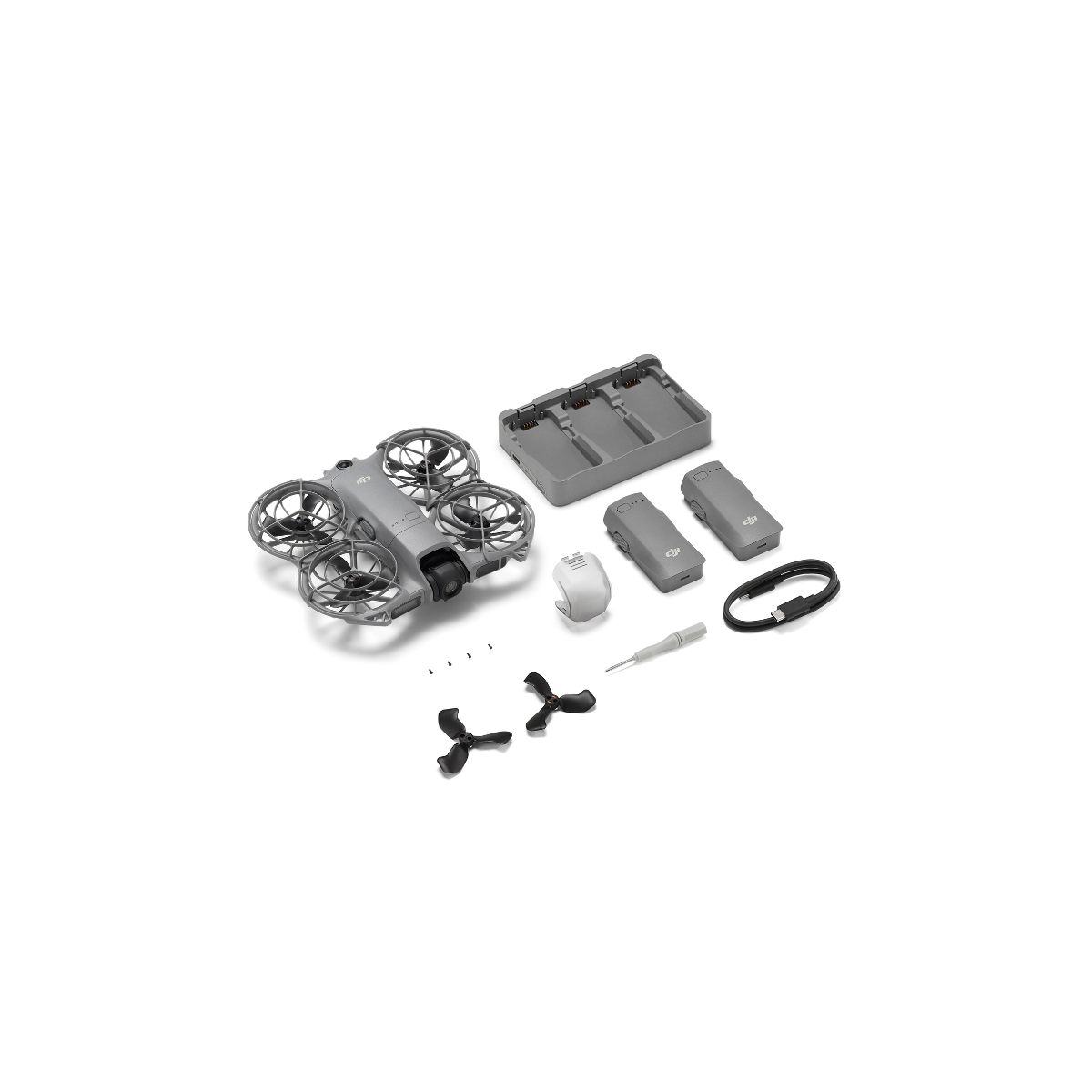
In the box:
DJI Neo 2 Aircraft x 1
DJI Neo 2 Intelligent Flight Battery x 3
DJI Neo 2 Two-Way Charging Hub x 1
DJI Neo 2 Spare Propeller (Pair) x 1
DJI Neo 2 Spare Propeller Screws x 4
Screwdriver x 1
DJI Neo 2 Propeller Guard (Pair x 1)
DJI Neo 2 Gimbal Protector x 1
USB-C to USB-C Data Cable x 1
Specifications
Takeoff Weight: 151 g (without DJI Neo 2 Digital Transceiver); 160 g (with DJI Neo 2 Digital Transceiver)
The actual product weight may vary due to differences in batch materials and external factors.
Dimensions: 147×171×41 mm (L×W×H, with propeller guards and without DJI Neo 2 Digital Transceiver); 167×171×54 mm (L×W×H, with propeller guards and DJI Neo 2 Digital Transceiver)
Max Ascent Speed: 0.5 m/s (Cine Mode); 3 m/s (Normal Mode); 5 m/s (Sport Mode)
Maximum speed measured in an open, windless environment, with the drone taking off from an altitude of 0 m and controlled via remote controller. Data are for reference only.
Max Descent Speed: 0.5 m/s (Cine Mode); 3 m/s (Normal Mode); 3 m/s (Sport Mode)
Maximum speed measured in an open, windless environment, with the drone taking off from an altitude of 0 m and controlled via remote controller. Data are for reference only.
Max Horizontal Speed: 8 m/s (Normal Mode); 12 m/s (Sport Mode); 12 m/s (tracking status)
Maximum speed measured in an open, windless environment, with the drone taking off from an altitude of 0 m and controlled via remote controller. Data are for reference only.
Max Takeoff Altitude: 2000 m
Measured in a windless environment when taking off from an altitude of 2000 m and ascending vertically by 120 m, using Sport mode, and from 100% battery level until 20%. Data is for reference only. Always pay attention to reminders on the camera view during your flight.
Max Flight Time: Approx. 19 minutes (approx. 17 minutes with propeller guards)*
Each battery allows the drone to perform at least 20 palm takeoff and landing sequences in succession**
*Measured when flying forward at 4 m/s in a windless environment 20 m above sea level, without DJI Neo 2 Digital Transceiver, with camera parameters set to 1080p/30fps, video mode off, and from 100% battery until 0%.
**Measured after DJI Neo 2 is activated, with a fully charged battery and default settings, using Circle, Rocket, and Dronie modes; data is for reference only.
Max Hovering Time: Approx. 18 minutes (16.5 minutes with propeller guards)
Measured when hovering in a windless environment 20 m above sea level, without DJI Neo 2 Digital Transceiver, with camera parameters set to 1080p/30fps, video mode off, and from 100% battery until 0%.
Max Flight Distance: 7 km
Measured when flying forward at a speed of 9 m/s in a windless environment 20 m above sea level, without DJI Neo 2 Digital Transceiver, with camera parameters set to 1080p/30fps, video mode off, and from 100% battery until 0%. Results may vary depending on the environment, actual use, and firmware version.
Max Wind Speed Resistance: 10.7 m/s (Level 5)
Operating Temperature: -10° to 40° C (14° to 104° F)
Global Navigation Satellite System: GPS + Galileo + BeiDou
Hovering Accuracy Range:
Vertical: ±0.1 m (with vision positioning); ±0.5 m (with satellite positioning)
Horizontal: ±0.3 m (with vision positioning); ±1.5 m (with satellite positioning)
Internal Storage: 49 GB
Class: C0 (EU)
Camera
Image Sensor: 1/2-inch CMOS Sensor
Lens:
FOV: 119.8°
Format Equivalent: 16.5 mm
Aperture: f/2.2
Focus: 0.7 m to ∞
ISO Range:
Photo: 100–3200 (Single Auto); 100–12800 (Burst Auto/Timed Auto); 100–12800 (Manual)
Video: 100–12800 (Auto/Manual)
Shutter Speed:
Video: 1/8000–1/30 s
Photo: 1/8000–1/10 s
Max Image Size:
12 MP Photo
4000×3000 (4:3)
4000×2250 (16:9)
Still Photography Modes:
Single/Timed Shot
Single Shot: 12 MP
Timed Shot: 12 MP, 2/3/5/7/10/15/20/30/60 s
Photo Format: JPEG
Video Resolution:
Horizontal Shooting:
4K (4:3): 3840×2880@60/50/30fps
1080p (4:3): 1440×1080@60/50/30fps
4K (16:9): 3840×2160@100*/60/50/30fps
1080p (16:9): 1920×1080@100*/60/50/30fps
Vertical Shooting:
2.7K (9:16): 1512×2688@60/50/30fps
*4K/100fps and 1080p/100fps recording are only supported when using motion control or remote control.
Video Format: MP4
Max Video Bitrate: 80 Mbps
Supported File System: exFAT
Color Mode: Normal
Electronic Image Stabilization (EIS): Supports RockSteady and turning stabilization off.*
*The stabilization switch (On/Off) is only available when paired with goggles. When stabilization is turned off, footage captured supports offline stabilization with Gyroflow.
Gimbal
Stabilization: 2-axis mechanical gimbal (tilt, roll)
Mechanical Range:
Tilt: -125° to 105°
Roll: -43° to 43°
Controllable Range: Tilt: -90° to 70°
Max Control Speed (Tilt): 100°/s
Angular Vibration Range: ±0.01°
Image Roll Correction: Supports correction of footage recorded on the drone.
Live view correction is unavailable only when using with goggles.
Sensing
Sensing Type: Omnidirectional monocular vision system, paired with a downward infrared sensing system and forward-facing LiDAR
Forward:
Measurement Range: 0.5–10 m
Detection Range: 0.5–15 m
Effective Sensing Speed: Flight Speed ≤ 8 m/s
Backward:
Detection Range: 0.5–15 m
Effective Sensing Speed: Flight Speed ≤ 8 m/s
Lateral:
Detection Range: 0.5–15 m
Effective Sensing Speed: Flight Speed ≤ 8 m/s
Upward:
Detection Range: 0.5–15 m
Effective Sensing Speed: Flight Speed ≤ 3 m/s
Downward:
Detection Range: 0.5–15 m
Effective Sensing Speed: Flight Speed ≤ 3 m/s
Infrared Sensor:
Forward-Facing LiDAR: Measurement Range: 0.3–8 m (reflectivity > 10%); FOV: Horizontal 60°, Vertical 60°
Downward-Facing Infrared Sensor: Measurement Range: 0.3–8 m (reflectivity > 10%)
Operating Environment:
Forward, Backward, Left, Right, and Upward: Surfaces with discernible patterns and adequate lighting (lux > 5)
Downward: Surfaces with discernible patterns and adequate lighting (lux > 5), and surfaces that are diffusely reflective with reflectivity above 20% (e.g., walls, trees, people).
Video Transmission
Video Transmission System: Standard: Wi-Fi Video Transmission; Optional: DJI Neo 2 Digital Transceiver (O4)
Live View Quality:
With DJI RC-N3 Remote Controller: Up to 1080p/60fps
With DJI Goggles N3 + DJI RC Motion 3 / DJI FPV Remote Controller 3: Up to 1080p/60fps
With DJI Goggles 3 + DJI RC Motion 3 / DJI FPV Remote Controller 3: Up to 1080p/100fps
Operating Frequency:
2.400 GHz to 2.4835 GHz
5.170 GHz to 5.250 GHz
5.725 GHz to 5.850 GHz
Operating frequency allowed varies among countries and regions. Refer to local laws and regulations for more information.
Transmitter Power (EIRP):
2.4 GHz: < 26 dBm (FCC); < 20 dBm (CE/SRRC/MIC)
5.1 GHz: < 23 dBm (CE)
5.8 GHz: < 26 dBm (FCC); < 14 dBm (CE); < 26 dBm (SRRC)
Communication Bandwidth: Max 60 MHz
Max Transmission Distance (Unobstructed, Free of Interference):
FCC: 10 km; CE: 6 km; SRRC: 6 km; MIC: 6 km
Measured in an unobstructed outdoor environment free of interference using the remote controller or goggles and shows the farthest communication range for one-way, non-return flights under each standard. The maximum video transmission distance in actual flight is limited by the drone’s maximum flight distance. Always pay attention to RTH reminders during flight.
Max Transmission Distance (Unobstructed, With Interference):
Strong Interference (Urban): ~1.5–3 km
Medium Interference (Suburban): ~3–6 km
Low Interference (Seaside): ~6–10 km
Measured under FCC standard in unobstructed environments with typical interference. Used for reference only; actual transmission distance may vary.
Max Transmission Distance (Obstructed, With Interference):
Low Interference + Buildings: ~0–0.5 km
Low Interference + Trees: ~0.5–3 km
Measured under FCC standard in obstructed environments with typical low interference. For reference only; no guarantee for actual transmission distance.
Max Download Speed: Wi-Fi: 80 MB/s
Measured in a lab environment with minimal interference in supported 2.4 GHz and 5.8 GHz regions. Actual speeds may vary.
Lowest Latency:
With DJI RC-N3 or RC 2 Remote Controller: ~120 ms
With DJI Goggles N3 (1080p/60fps): Lowest latency 54 ms
With DJI Goggles 3 (1080p/100fps): Lowest latency 50 ms
Latency data refers to the minimum delay during goggles screen refresh in open, interference-free conditions. Actual performance may vary.
Max Video Bitrate: 60 Mbps
Antenna: 2 antennas, 1T2R
Wi-Fi
Protocol: 802.11a/b/g/n/ac/ax
Operating Frequency:
2.400 GHz to 2.4835 GHz
5.725 GHz to 5.850 GHz
Operating frequency allowed varies among countries and regions. Refer to local laws and regulations for more information.
Transmitter Power (EIRP):
2.4 GHz: < 20 dBm (FCC/CE/SRRC/MIC)
5.8 GHz: < 26 dBm (FCC/SRRC); < 14 dBm (CE)
Effective Operating Range: 500 m
Measured in an open outdoor environment free of interference. Actual transmission range may vary depending on the environment and mobile device performance.
Bluetooth
Protocol: Bluetooth 5.2
Operating Frequency: 2.400 GHz to 2.4835 GHz
Operating frequency allowed varies among countries and regions. Refer to local laws and regulations for more information.
Transmitter Power (EIRP): < 10 dBm
Battery
Capacity: 1606 mAh
Weight: 46 g
Nominal Voltage: 7.16 V
Max Charging Voltage: 8.6 V
Type: Li-ion
Chemical System: LiNiMnCoO₂
Energy: 11.5 Wh
Charging Temperature: 5° to 40° C (41° to 104° F)
Charging Time:
Using Two-Way Charging Hub (65W max): ~68 minutes to charge three batteries simultaneously (0%→100%)
Direct Charging (via aircraft body, 15W max): ~70 minutes (0%→100%)
Charging time measured in a 25° C (77° F) environment. Actual time may vary with temperature or regional voltage differences.
Charger
Recommended Charger: DJI 65W Portable Charger; USB Power Delivery chargers
Battery Charging Hub
Input:
5 V, max 5 A
9 V, max 5 A
12 V, max 5 A
15 V, max 4.33 A
20 V, max 3.25 A
Max current depends on adapter capability.
Output (Charging): 5 V, 2 A
Charging Method: 3 batteries charged simultaneously
The number of batteries charged simultaneously depends on charger power:
‣ Above 45 W → three batteries
‣ 30–45 W → two batteries
‣ Below 30 W → sequential charging from highest to lowest charge.
Refer to supported charging protocols.
Compatibility: DJI Neo 2 Intelligent Flight Battery
Storage
Recommended microSD Cards: Not supported. Does not support external SD card expansion.
DJI RC-N3 Remote Controller
Max Operating Time: 3.5 hours (without charging mobile device); 1.5 hours (while charging device)
Operating Temperature: -10° to 40° C (14° to 104° F)
Charging Temperature: 5° to 40° C (41° to 104° F)
Charging Time: 2 hours
Charging Method: 5 V, 2 A
Battery Capacity: 2600 mAh
Weight: ~320 g
Dimensions: 104.2×150×45.2 mm (L×W×H)
Operating Frequency:
2.400 GHz to 2.4835 GHz
5.170 GHz to 5.250 GHz
5.725 GHz to 5.850 GHz
Operating frequency allowed varies among countries and regions. Refer to local laws and regulations for more information.
Transmitter Power (EIRP):
2.4 GHz: < 33 dBm (FCC); < 20 dBm (CE/SRRC/MIC)
5.1 GHz: < 23 dBm (CE)
5.8 GHz: < 33 dBm (FCC); < 14 dBm (CE); < 30 dBm (SRRC)
Disclaimer
All videos and photos on this page captured with the DJI Neo 2 were taken by professionals under strict compliance with local laws and regulations and have undergone varying degrees of post-editing. All videos and images are for illustration purposes only; please refer to actual shooting results. Before flying, make sure you understand local laws and regulations, ensure your aircraft has the required certifications, and obtain the necessary flight permissions for the airspace.
** All parameter values listed on this page were measured in controlled test environments using production-version DJI Neo 2 aircraft. Actual results may vary depending on external conditions, usage, and firmware versions. Please refer to your actual experience.
*** All product images, videos, and on-screen contents on this page are for reference only. The actual product (including but not limited to appearance, color, and size) and on-screen display (including but not limited to backgrounds, UI, and illustrations) may differ. Please refer to the actual product.
Palm Takeoff and Landing:
Follow these guidelines when performing palm takeoff/landing: operate in windless environments; keep your palm level and still, and avoid contact with the propellers; do not attempt to grab the aircraft while it is in flight.Gesture Control Usage and Precautions:
When using this feature, ensure the surroundings are safe and free of moving people, animals, or vehicles. The aircraft cannot detect small obstacles (such as wires or thin branches), transparent objects (such as glass or water surfaces), or solid-color objects (such as white walls). Avoid using gesture control in such environments. It is recommended to use the feature under suitable lighting conditions; gesture control may not function when ambient light is too dim (below 5 lux) or too bright (above 100,000 lux). Gesture control is only supported in Focus or Follow modes and is not available when using the remote controller or motion control. Maintain a distance of approximately 2–5 meters between the operator and the aircraft. Fingers must be fully extended; thick or mitten-style gloves are not supported. The target must be fully visible in the frame without obstruction.
During Palm Landing, maintain a horizontal distance of 2–5 meters and a vertical distance no greater than 2 meters between the drone and your palm. If the aircraft does not respond at close range, adjust its position via gesture control or reposition yourself to avoid visual blind spots before retrying.
For single-arm Raise-to-Recall, keep the horizontal distance within 10 meters and fully extend one arm. Do not raise both arms simultaneously, as the aircraft will not recognize the command.ActiveTrack:
Use the ActiveTrack feature in open environments. Scenarios where recording is not supported or may be interrupted are detailed in the user manual. Exercise caution when using automatic modes in complex environments with many obstacles to ensure flight and personnel safety.Omnidirectional Obstacle Sensing:
The obstacle sensing system provides auxiliary safety functions under limited conditions and cannot replace manual judgment and control. Always stay aware of the surroundings and heed warnings in the DJI Fly app, maintaining control of the aircraft at all times.
When GPS is unavailable, the Vision Positioning System performs best at altitudes between 0.5 and 10 meters; performance may degrade outside this range. Exercise caution when flying over water, as the vision system may not function properly and the aircraft may not automatically avoid the water surface during landing.
The vision system cannot detect:
large hollow or wire-like structures (e.g., cranes, high-voltage towers, cables), surfaces lacking or having sparse texture, highly repetitive patterns (e.g., tiled floors with identical grids), solid-color surfaces (pure black, white, red, or green), reflective or mirror-like surfaces (e.g., ice, road signs), water or transparent surfaces, moving surfaces (e.g., crowds, blowing foliage), moving obstacles (e.g., people or vehicles), scenes with extreme lighting changes, extremely dark (<1 lux) or bright (>100,000 lux) surfaces, materials with strong infrared absorption or reflection (e.g., mirrors, glass, road signs, asphalt), thin obstacles (e.g., fences, branches, wires), or slender poles (e.g., lamp posts, power poles).
Do not obstruct or interfere with the sensing system in any way. Ensure camera lenses are clear, free of dirt or scratches. After long storage, recalibration may be required; the DJI Fly app will prompt and automatically initiate calibration.
Do not fly in rain, fog, or when visibility is below 100 meters. Before takeoff, inspect the sensing system: remove films, stickers, or other coverings; clean off water, fingerprints, or stains using a lint-free cloth only — do not use alcohol or organic solvents. If the lens glass is loose, cracked, scratched, or worn, contact DJI for service. Refer to the product manual for details.All-Domain Flight:
“All-domain flight” means the DJI Neo 2 can operate both indoors and outdoors, with significantly improved performance over water and snowy surfaces compared to previous generations.
Before flight, understand local laws and regulations, ensure compliance with certification requirements, and obtain the necessary flight permissions. When satellite signals are weak, flight performance may be affected when flying close to solid-color, transparent, or textureless surfaces. Fly with caution under good lighting conditions.
When flying over water, maintain an altitude of at least 1 meter to ensure flight safety. Refer to the user manual for details.Maximum resolution in vertical shooting mode is 2.7K.
Maximum speed is measured with the aircraft taking off from sea level in calm, open environments and controlled via remote controller — for reference only.
Accessories:
Requires use with DJI Goggles (DJI Goggles N3 or DJI Goggles 3) and DJI Motion Controller (DJI Motion Controller 3 or DJI FPV Remote Controller 3). When operating the DJI Neo 2, comply with local laws and regulations and ensure flight safety.